
Sensor configurations
Sensor configurations
Default sensor configurations
Fine tuning sensor positions
Sensor configurations
EEG configurations are usually assumed to be equal for all subjects in a study, sufficiently standardized by the elastic head caps used for measuring. They are loaded from the default directory (emegs2dUtil/SensorCfg). Configurations for grand averages across subjects are assumed to be equal to individual configurations. EMEGS (Qt version) uses text files with the *.qecfg file extension as sensor configuration format. These files are tab delimited text files with 8 columns and one header line.
Type Name InRawFile RefWeight Occular Theta Phi Rho
EEG Fp1 Yes 0 No -1.6057 -1.25664 0.09
EEG AF7 Yes 0 No -1.6057 -0.942478 0.09
EEG AF3 Yes 0 No -1.29154 -1.13446 0.09
EEG F1 Yes 0 No -0.872665 -1.18682 0.09
… … … … … … … …
EEG LA1 Yes 0 HEOG_L -1.96175 -0.842842 0.09
EEG LA2 Yes 0 LVEOG_B 2.17302 1.9583 0.09
EEG LA3 Yes 0 LVEOG_T 1.77549 1.8746 0.09
EEG RA1 Yes 0 HEOG_R 1.96175 0.842842 0.09
EEG RA2 Yes 0 RVEOG_B 2.17302 1.1833 0.09
EEG RA3 Yes 0 RVEOG_T 1.77549 1.26698 0.09
EEG A1 Yes 0.5 No -2.00713 0.1 0.09
EEG B1 Yes 0.5 No 2.00713 -0.1 0.09
STATUS Status Yes 0 No NAN NAN NAN
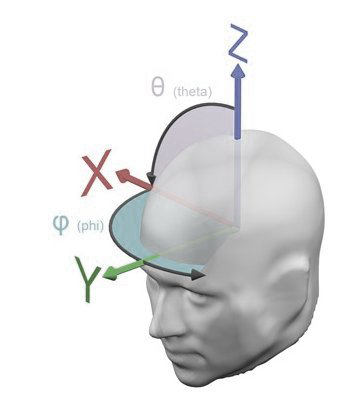
The last three columns contain the sensor positions, specified as spherical coordinates consisting of the two angles theta and phi and a radius rho, with theta and phi measured from the upward (z) axes as shown in the graph below. Although EMEGS (Qt versions) displays data on a realistically shaped head model, sensor approximation, inverse modeling and similar calculations are performed using a spherical head model with the constant default radius of 9 cm for all sensors. Top]
Creating *.qecfg files
You can prepare your sensor coordinates in Excel or any other Spreadsheet application and copy and paste the content in a text editor. Save the file as text file with the *.qecfg extension. Make sure to remove trailing empty lines at the end.
Default sensor configurations
EEG configurations and standard MEG configurations are found by checking a list of possible configuration files for the first occurence of the channel number in question. This list is stored in the study definition of a study folder and can be modified using the configure study dialog:
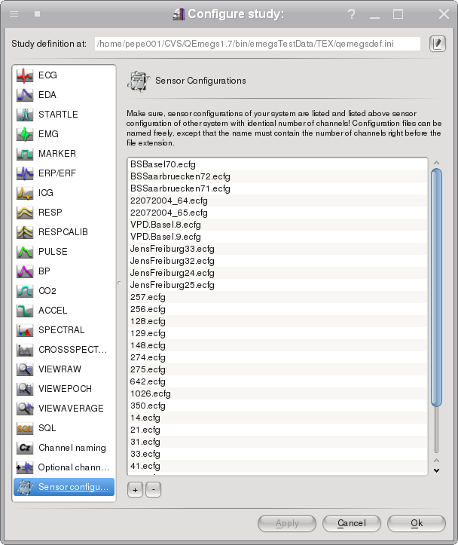
This list initially contains a fiew default entries, but you will likely add your own files on top of this list. Entries are searched from top to bottom for the first file, which contains the correct number of channels right before the file extension. In the example above, if you open a data file with 129 data channels, the file 129.ecfg will be used. Sensor configuration files are loaded from the emegs2dUtil/SensorCfg/-folder (except for the case of individual configurations), so for this example, the sensor configuration file ./emegs2dUtil/SensorCfg/129.ecfg will be loaded. [Top]
Fine tuning sensor positions
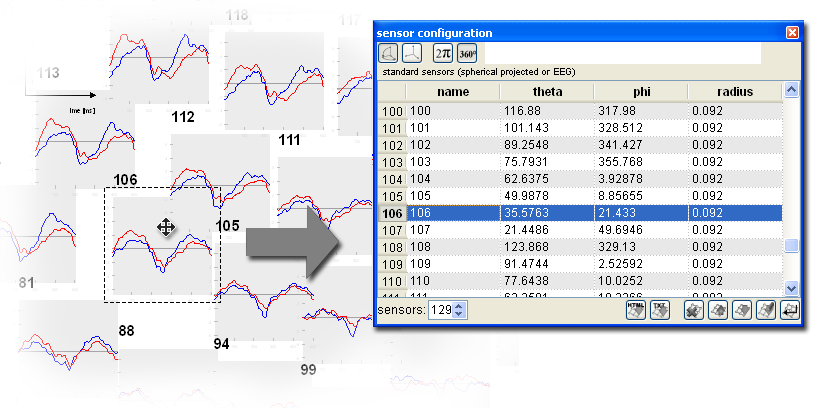
When sensor axes are arranged as planar projection and the arrow selection type is selected, sensor axes can be selected and then dragged to an arbitrary position. 2d-XY-Coordinates are retransformed to sperical coordinates which are updated accordingly on the sensor configuration docking window. Save the thus modified sensor configuration to save changes of the sensor positions for later use. Push the set sensor set button on the sensor configuration docking window to apply the sensor configuration for 3d display. [Top]
====================== under construction ================================================
MEG configurations on the other hand are assumed to vary across subjects, due to the larger clearance between the head and the sensors in the (fixed size) MEG dewar. Therefore, with the individual sensor format, sensor configurations are loaded from the folder where the datafile resides, allowing every datafile to have it’s own configuration living in the same directory. Set the sensor type to individual on the menu shown below:

For the inidividuel sensor type, the sensor configuration file must be named exactly as the data file, except for the file extension, which must be *.pmg. Optionally head surface points can be given in a *.sfp file, origin coordinates can be given in a *.cot file, both files again named as the datafile except the file extension. The *.pmg, *.sfp and *.cot files are standard text files, as procuded by CTF and BTI MEG systems.
MEG Grand averages can also be loaded with the SCADS sensor format, using an averaged or default configuration from the /emegs2dUtil/SensorCfg folder. Please note however, that sensor space regularization may be necessary to compensate for the sensor position variance across subjects.[Top]
====================== under construction ================================================